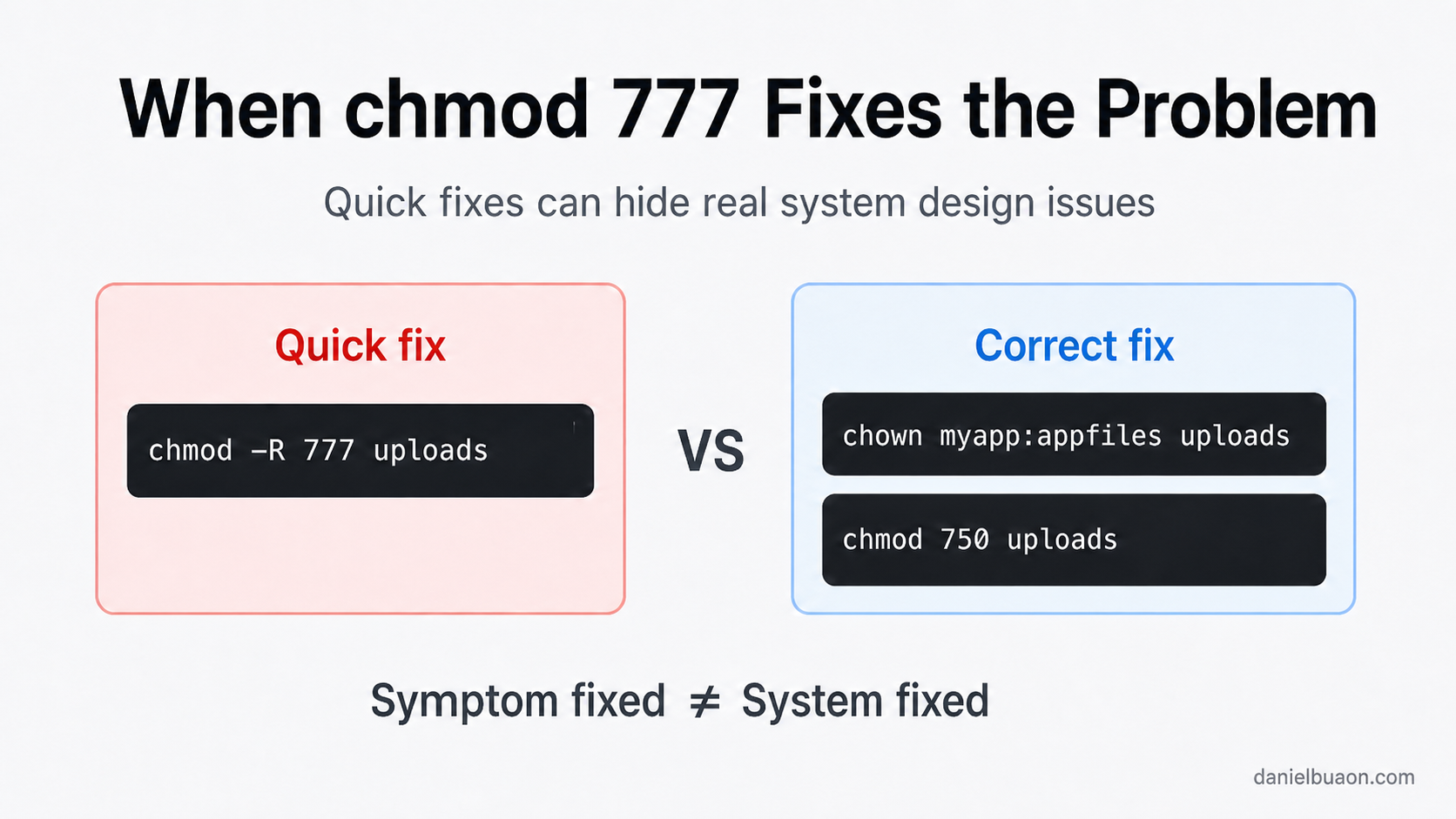

When chmod 777 “Fixes” the Problem: AI, Linux Permissions, and the Human Troubleshooting Gap
May 2, 2026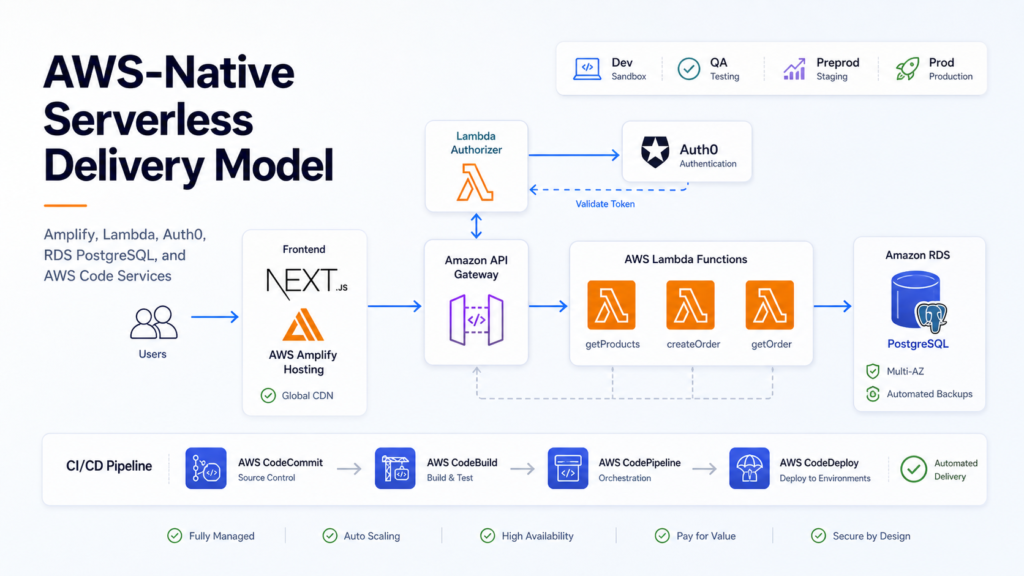
Building an AWS-Native Serverless Delivery Model with Amplify, Lambda, Auth0, and CodePipeline
By Daniel Buaon
Senior Cloud & AI Infrastructure Engineer
Introduction
This is an anonymized portfolio case study based on a real serverless application delivery model I worked on.
The goal was to create an initial infrastructure foundation that could scale automatically, use AWS-native services as much as possible, and support multiple environments with repeatable CI/CD automation.
The application was a Next.js-based set of internal tools for sales teams at an enterprise storage solutions provider. Its purpose was to help automate technical configurations and quotation-related workflows.
It had two main parts:
- A Next.js frontend application hosted on AWS.
- A backend implemented with serverless AWS services.
At first glance, this may sound like a typical serverless architecture. But the interesting part was not only the list of services. The real work was in making several architecture decisions under practical project constraints:
- Should Amplify be used as a full-stack platform or only for frontend hosting?
- Should the backend be coupled to Amplify-specific libraries and conventions?
- Should external DevOps tools such as Terraform, GitHub Actions, GitLab, Jenkins, or Ansible be introduced?
- How should environments such as Dev, QA, Preprod, and Prod be managed?
- How could new Lambda functions be added with minimal manual deployment work?
The final solution used AWS Amplify Hosting for the frontend, while the backend was implemented with API Gateway, AWS Lambda, Lambda Authorizer, Auth0, CloudFormation, AWS SDK, CodeCommit, CodeBuild, CodeDeploy, and CodePipeline.
The result was an AWS-native serverless delivery model designed to provide a scalable starting point without introducing unnecessary external tooling during the initial phase.
Scope and constraints
My scope in the project was to design and implement an initial infrastructure and delivery model that could scale automatically while staying aligned with AWS-native services wherever possible.
Because of that, the goal was not to introduce a broad DevOps toolchain from day one.
Tools such as Terraform, GitLab, GitHub Actions, Jenkins, and Ansible were intentionally not added to the initial solution. This was not because those tools were not useful. In many projects, they are excellent choices. But in this specific context, the objective was to reduce external dependencies and build the first version of the platform using managed AWS services.
That constraint influenced several decisions:
- AWS Amplify was selected for hosting the Next.js frontend.
- API Gateway and Lambda were used for backend APIs.
- Amazon RDS for PostgreSQL was used as the relational database layer, with one database instance per environment.
- Auth0 was used as the external identity provider.
- A custom Lambda Authorizer protected backend endpoints.
- CloudFormation was used for infrastructure as code.
- AWS SDK was used to complement CloudFormation where dynamic automation was needed.
- CodeCommit, CodeBuild, CodeDeploy, and CodePipeline provided the CI/CD workflow.
The result was not a generic platform. It was an AWS-native application delivery model designed for the project’s initial needs.
Choosing the frontend hosting strategy
One of the first decisions was how to deploy the Next.js frontend.
Several options were considered, including generic serverless deployment approaches, Serverless Framework, container-based deployment, and AWS-native hosting alternatives. Docker was also part of the discussion, but it would have introduced a container hosting model that did not fully match the serverless direction of the rest of the architecture.
Serverless Framework was also evaluated because it was a well-known option for packaging and deploying serverless applications. It could have provided a mature deployment abstraction for Lambda and related resources. However, for this project, it would also have introduced another toolchain and another framework-specific layer on top of AWS. Since the project scope favored AWS-native services and the frontend decision was specifically about hosting a Next.js application, Serverless Framework was not selected as the frontend hosting path.
Since the backend was already designed around AWS serverless services such as Lambda, API Gateway, IAM, CloudFormation, CodeBuild, CodeDeploy, CodePipeline, and CodeCommit, AWS Amplify Hosting became a natural fit for the frontend.
The key point is that the decision was not simply:
Use Amplify or do not use Amplify.
The real decision was:
How much of the Amplify ecosystem should be adopted?
Amplify Hosting solved the frontend hosting problem well. It provided a simple AWS-native way to deploy the frontend and integrate it with branch-based workflows.
However, adopting the full Amplify backend model would have been a different decision.
In that comparison, Amplify Hosting was not chosen because it was the only possible serverless option. It was chosen because it solved the frontend hosting problem directly while staying inside the AWS ecosystem. Serverless Framework and similar tools were better aligned with backend/serverless deployment automation than with the specific frontend hosting requirement.
Why Serverless Framework was not selected for this scope
Serverless Framework was part of the evaluation because it was a common choice for serverless application deployment.
It could have helped define and deploy Lambda-based backend resources using a framework-oriented approach. That made it relevant to the discussion, especially because the backend was serverless.
However, there were two main reasons why it was not selected for the initial delivery model.
First, the frontend requirement was about hosting and deploying a Next.js application. Amplify Hosting addressed that requirement more directly by providing AWS-native frontend hosting and branch-based deployments.
Second, the project scope was to use AWS-native services wherever possible. Adding Serverless Framework would have introduced another abstraction layer, another configuration model, and another toolchain to maintain. For the initial phase, the team preferred to keep the implementation based on CloudFormation, AWS SDK, and AWS Code services.
This does not mean Serverless Framework was a bad option. It simply did not match the constraints of this specific project as well as the selected AWS-native approach.
Why Amplify was used only for frontend hosting
At the time, we evaluated using the newer Amplify backend model, including its integrated backend workflows and developer sandboxes.
That option was attractive because it promised a more streamlined full-stack developer experience. Developer sandboxes, backend integration, and managed workflows could have simplified some parts of the development process.
However, it came with an important trade-off.
Using the Amplify backend model would have required changes in the backend codebase and the adoption of Amplify-specific libraries, conventions, and workflows.
For this project, we wanted the backend to remain closer to native AWS services. The backend already depended on Lambda, API Gateway, custom authorization, infrastructure as code, and AWS-native CI/CD. Coupling it to Amplify backend abstractions would have reduced flexibility and introduced a platform-specific development model that was not required for the initial scope.
So the decision was to use Amplify where it provided clear value with minimal coupling:
- Frontend hosting.
- Branch-based frontend deployments.
- AWS-native integration.
The backend remained independent and was built with explicit AWS services.
This separation gave the architecture a clean boundary:
- Amplify handled frontend delivery.
- Native AWS serverless services handled backend APIs, authorization, infrastructure, and deployment automation.
High-level architecture
The final architecture included the following components. The repository contained backend services implemented as independent AWS Lambda functions, API Gateway definitions, custom authorizer code, CloudFormation templates, AWS CodePipeline definitions, CodeBuild build specifications, and TypeScript automation scripts for stack updates and Lambda deployments.
For the frontend:
- Next.js application.
- AWS Amplify Hosting.
- Branch-based deployment.
- Auth0 login integration.
- API calls to protected backend endpoints using JWT tokens.
For the backend:
- Amazon API Gateway.
- AWS Lambda business functions.
- Custom Lambda Authorizer.
- Auth0 as external identity provider.
- Amazon RDS for PostgreSQL as the relational database layer, with one database instance per environment.
- CloudFormation for infrastructure definition.
- AWS SDK for automation tasks that were difficult to express only with static templates.
- AWS Code services for CI/CD.
For delivery automation:
- CodeCommit as the source repository.
- CodeBuild for build and packaging tasks.
- CodeDeploy for deployment coordination where needed.
- CodePipeline for orchestration.
- Environment-specific pipelines triggered by commits to the corresponding branches.
- Environment-specific Amazon RDS for PostgreSQL database instances.
This architecture kept the application serverless, AWS-native, and relatively simple to operate during the initial phase, while supporting a business workflow focused on automating storage solution configurations and quotation processes.
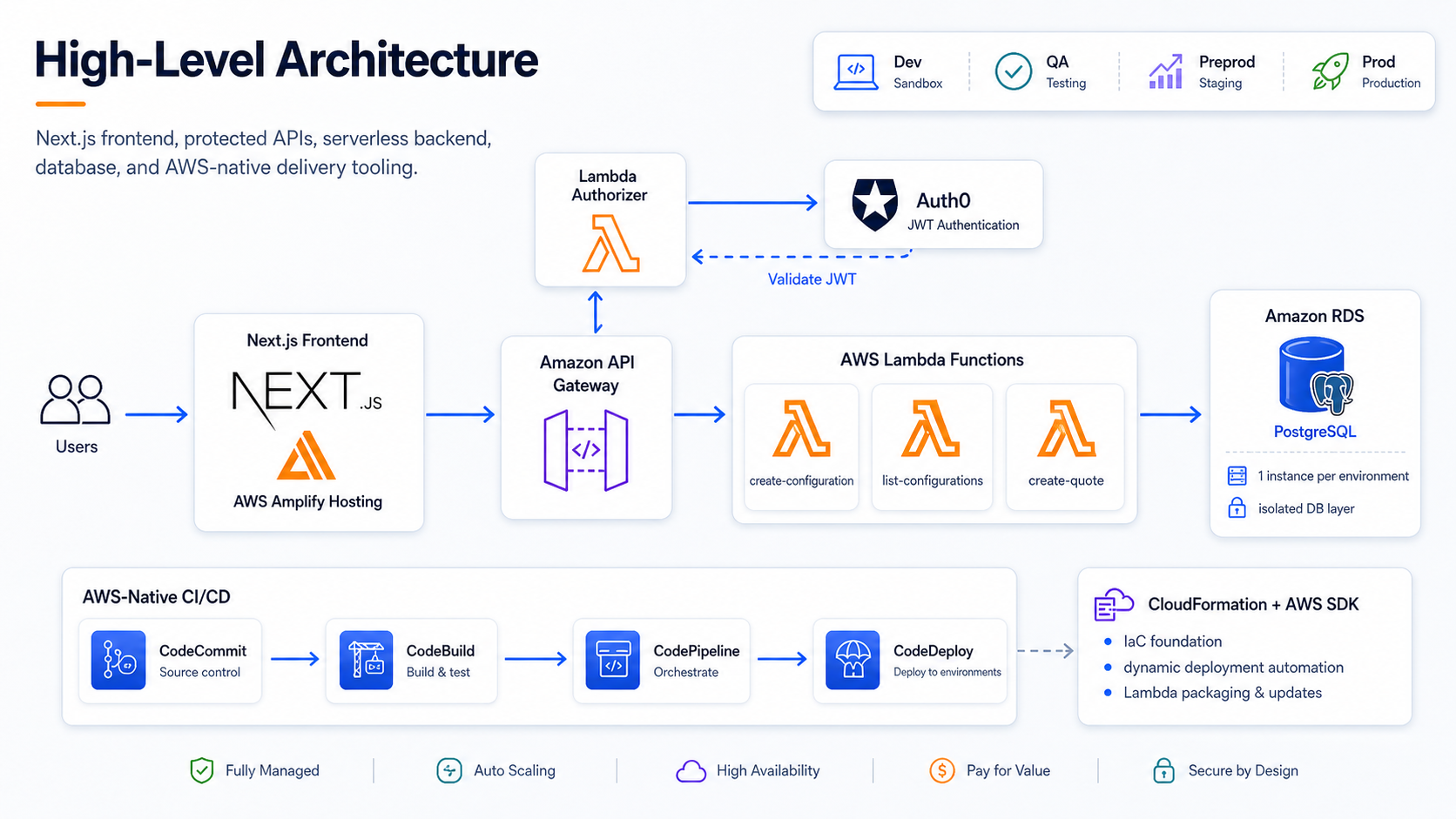
High-level AWS-native architecture for the Next.js frontend, protected APIs, Lambda backend, database layer, infrastructure automation, and CI/CD services.
Authentication and API authorization
The backend APIs required authenticated access.
Instead of embedding authorization logic inside every Lambda function, the architecture used API Gateway with a custom Lambda Authorizer.
Auth0 was used as the external identity provider. Users authenticated
through Auth0, and the frontend obtained a JWT access token. When
calling the backend API, the frontend sent that token in the
Authorization header.
API Gateway delegated authorization to the Lambda Authorizer before invoking the backend Lambda functions.
At a high level, the flow worked like this:
- The user signed in through Auth0.
- The frontend received a JWT access token.
- The frontend called API Gateway with the token.
- API Gateway invoked the Lambda Authorizer.
- The authorizer validated the token.
- If the token was valid, API Gateway forwarded the request to the backend Lambda.
- If the token was invalid, the request was rejected before reaching the business logic.
The authorizer was responsible for validating the relevant token properties, such as issuer, audience, signature, and claims.
A simplified Lambda Authorizer shape looked like this:
const jwksClient = require("jwks-rsa");
const jwt = require("jsonwebtoken");

const client = jwksClient({
  cache: true,
  rateLimit: true,
  jwksRequestsPerMinute: 10,
  jwksUri: process.env.JWKS_URI,
});

function policy(effect, resource) {
  return {
    Version: "2012-10-17",
    Statement: [
      {
        Action: "execute-api:Invoke",
        Effect: effect,
        Resource: resource,
      },
    ],
  };
}

exports.handler = async (event) => {
  const token = event.authorizationToken?.replace("Bearer ", "");

  if (!token) {
    throw new Error("Unauthorized");
  }

  const decoded = jwt.decode(token, { complete: true });
  const key = await client.getSigningKey(decoded.header.kid);
  const signingKey = key.publicKey || key.rsaPublicKey;

  const verified = jwt.verify(token, signingKey, {
    audience: process.env.AUTH0_AUDIENCE,
    issuer: process.env.AUTH0_ISSUER,
  });

  return {
    principalId: verified.sub,
    policyDocument: policy("Allow", event.methodArn),
    context: {
      scope: verified.scope || "",
    },
  };
};
This example is intentionally simplified and sanitized. A production authorizer must also handle invalid tokens, missing claims, scope checks, deny policies, logging hygiene, and error handling correctly before returning an allow policy.
This design created a clean separation of concerns.
Business Lambdas did not need to implement the same authentication checks repeatedly. API authorization was centralized at the API Gateway layer through the Lambda Authorizer.
That was an important design decision because it made the backend easier to reason about and reduced duplicated security logic across functions.
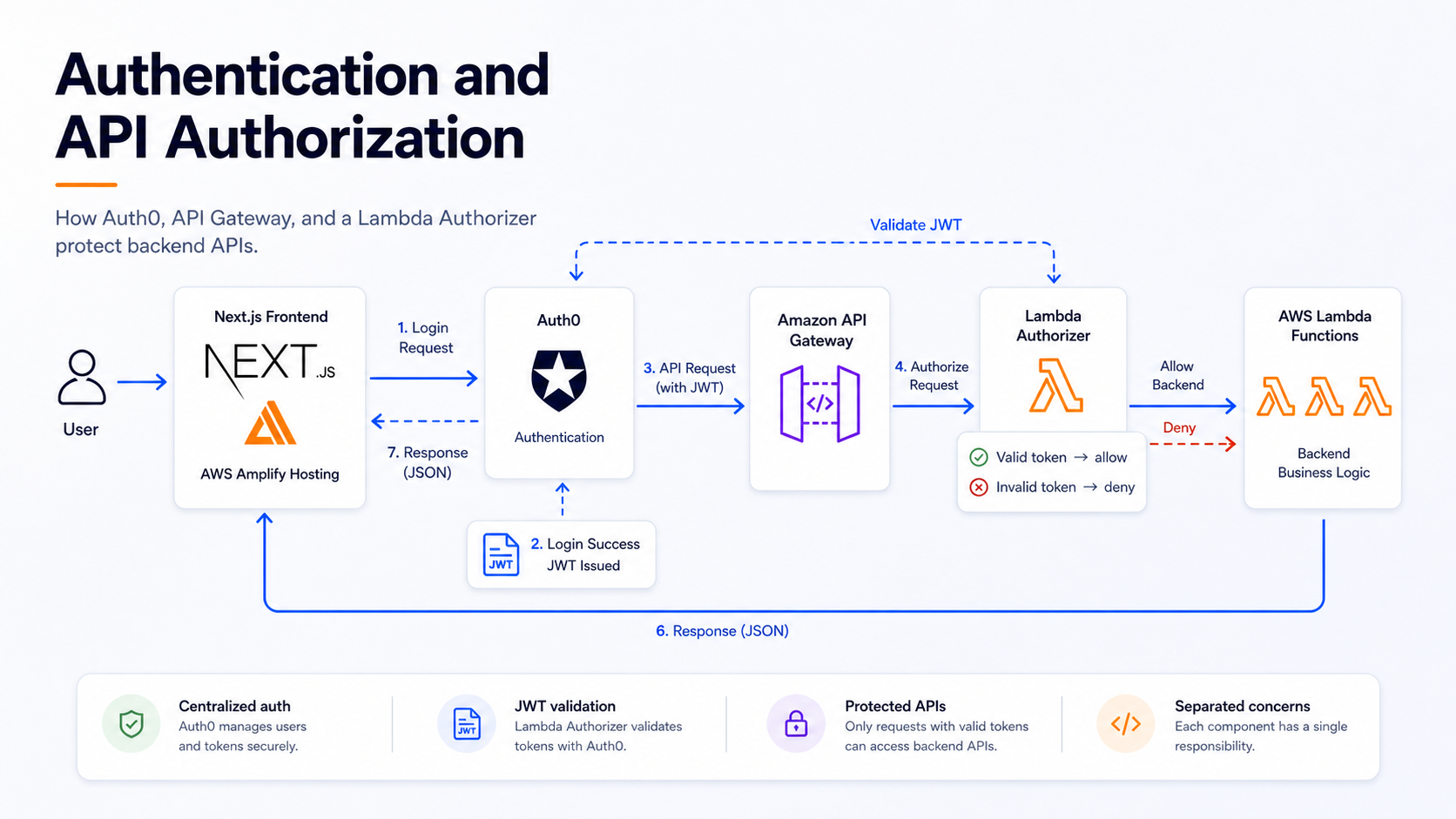
Authentication and API authorization flow using Auth0, API Gateway, and a custom Lambda Authorizer.
Infrastructure as Code with CloudFormation and AWS SDK
CloudFormation was used as the main infrastructure as code tool.
This aligned with the AWS-native constraint of the project. It also avoided introducing Terraform or another external IaC tool during the initial phase.
However, CloudFormation was not as flexible as Terraform or some other infrastructure as code tools for certain dynamic automation needs.
The challenge was not simply creating static resources. Some parts of the delivery model required procedural logic, discovery, packaging, and dynamic handling of multiple Lambda functions.
For example, the pipeline needed to work with a directory structure containing Lambda function source code. It needed to detect functions, package them, and deploy them based on repository conventions. That type of workflow was easier to implement by complementing CloudFormation with AWS SDK-based automation.
This combination was practical:
- CloudFormation defined the core infrastructure resources.
- AWS SDK handled dynamic automation where CloudFormation was less flexible.
- CodeBuild executed the build, packaging, and deployment scripts.
- CodePipeline orchestrated the flow.
The important lesson was that IaC does not always mean using only declarative templates. In real projects, declarative infrastructure often needs to be complemented by procedural automation.
In this case, AWS SDK was not used as a replacement for infrastructure as code. It was used to fill the gaps where CloudFormation alone was not flexible enough for the required deployment workflow.
A simplified CloudFormation template for one Lambda looked like this:
Resources:
  LambdaLogGroup:
    Type: AWS::Logs::LogGroup
    Properties:
      LogGroupName: !Sub /aws/lambda/${AWS::StackName}
      RetentionInDays: 7

  LambdaFunction:
    Type: AWS::Lambda::Function
    Properties:
      FunctionName: !Ref AWS::StackName
      Runtime: nodejs20.x
      Handler: lambda.handler
      Timeout: 30
      MemorySize: 512
      Role: LAMBDA_EXECUTION_ROLE_ARN
      Code:
        ZipFile: "placeholder - updated by deployment automation"
      Environment:
        Variables:
          DBNAME: app_database
          DBPROXYURL: DB_PROXY_ENDPOINT
          DBREGION: AWS_REGION
          DBUSER: DB_USERNAME
      VpcConfig:
        SecurityGroupIds:
          - SECURITY_GROUP_ID
        SubnetIds:
          - SUBNET_ID

  LambdaInvokePermission:
    Type: AWS::Lambda::Permission
    Properties:
      FunctionName: !Ref LambdaFunction
      Action: lambda:InvokeFunction
      Principal: apigateway.amazonaws.com
      SourceArn: !Sub arn:aws:execute-api:${AWS::Region}:${AWS::AccountId}:API_GATEWAY_ID/*/*/*
The template defined the infrastructure shape, but the Lambda code artifact was handled separately by the pipeline. That allowed infrastructure creation and code updates to be treated as related but distinct steps.
A simplified TypeScript script for creating or updating the CloudFormation stack looked like this:
import { Stack } from "@atombrenner/cfn-stack";
import * as fs from "fs";
import * as path from "path";

const serviceDir = path.resolve(__dirname, "..");
const templatePath = path.resolve(__dirname, "cloudformation.yaml");
const paramsPath = path.resolve(__dirname, "params.json");

const stackName = path.basename(serviceDir);
const template = fs.readFileSync(templatePath, "utf-8");
const params = JSON.parse(fs.readFileSync(paramsPath, "utf-8"));

const stack = new Stack({
  name: stackName,
  region: params.region,
});

await stack.createOrUpdate(template, {
  RestApiId: params.RestApiId,
  ParentResourceId: params.ParentResourceId,
  AuthorizerId: params.AuthorizerId,
  DBNAME: params.DBNAME,
  DBPROXYURL: params.DBPROXYURL,
  DBREGION: params.DBREGION,
  DBUSER: params.DBUSER,
});
The actual project values were environment-specific and must be treated as private configuration, not as public code examples.
What the backend repository contained
The backend repository followed a service-oriented structure. Each backend capability was implemented as a separate Lambda function with its own source code, build configuration, infrastructure template, packaging script, and deployment script.
A sanitized version of the structure looked like this:
services/
  api-gateway/
    service-api.yaml

  lambdas/
    create-configuration/
      src/
        lambda.ts
        start.ts
      infrastructure/
        cloudformation.yaml
        stack.ts
        zip.ts
        deploy.ts
      package.json
      buildspec.yaml

    list-configurations/
      src/
        lambda.ts
        start.ts
      infrastructure/
        cloudformation.yaml
        stack.ts
        zip.ts
        deploy.ts
      package.json
      buildspec.yaml

  authorizers/
    jwt-authorizer/
      index.js
      lib.js
      cloudformation/
        lambda-authorizer.yaml

  pipelines/
    buildspec.yml
    example-pipeline.json
The important part was the convention: Lambda functions were isolated by folder, and each one carried the files required to build, package, and deploy it.
The repository also included CloudFormation templates for API Gateway
methods, Lambda permissions, log groups, Lambda runtime configuration,
VPC configuration, environment variables, and API Gateway deployments.
Sensitive values such as account IDs, ARNs, API IDs, subnet IDs,
security group IDs, database endpoints, and repository names should
never be published directly. In this article, those values are replaced
with placeholders such as AWS_ACCOUNT_ID,
LAMBDA_EXECUTION_ROLE_ARN, API_GATEWAY_ID,
SECURITY_GROUP_ID, SUBNET_ID, and
DB_PROXY_ENDPOINT.
Database layer
The application also used Amazon RDS for PostgreSQL as its relational database layer.
Each environment had its own database instance. This matched the
environment separation strategy used across the rest of the
architecture: dev, qa, preprod,
and prod were isolated not only at the pipeline and
infrastructure level, but also at the database level.
This approach helped keep testing, validation, and production workloads separated. Changes could move through the environment promotion flow without sharing the same database backend across stages.
At a high level:
devhad its own RDS PostgreSQL instance.qahad its own RDS PostgreSQL instance.preprodhad its own RDS PostgreSQL instance.prodhad its own RDS PostgreSQL instance.
The trade-off was additional infrastructure to manage, but the benefit was clearer isolation between environments.
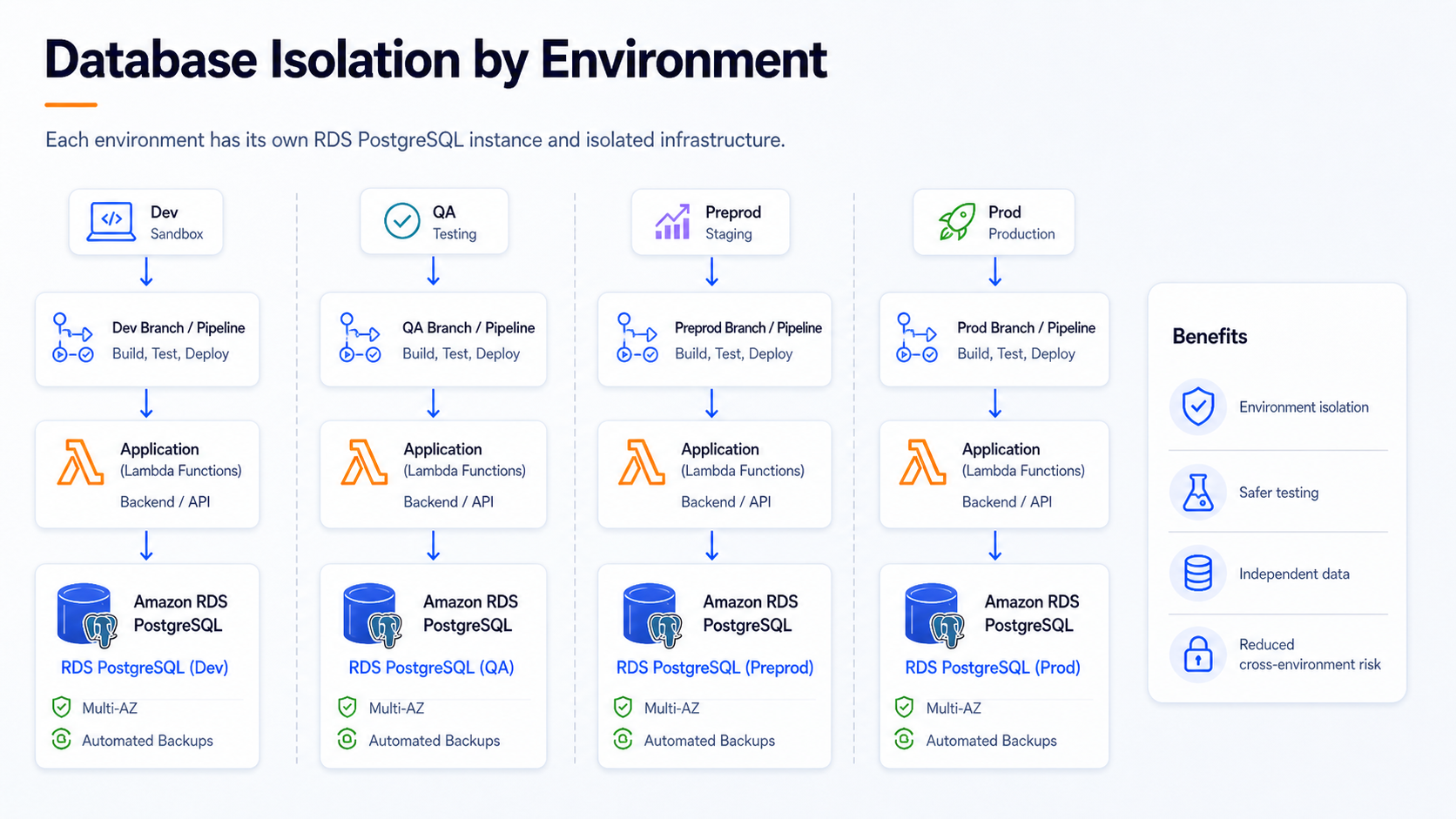
Separate RDS PostgreSQL database instances for Dev, QA, Preprod, and Prod environments.
CI/CD with AWS Code services
The CI/CD model was built using AWS-native services.
The main components were:
- CodeCommit for source control.
- CodeBuild for build and packaging.
- CodeDeploy where deployment coordination was required.
- CodePipeline for orchestration.
Each environment had its own pipeline and infrastructure stack.
A commit to the corresponding environment branch triggered the pipeline automatically. The pipeline then executed the build, packaging, and deployment steps for that environment.
This made the deployment flow explicit:
- Push or merge code into an environment branch.
- Trigger the corresponding pipeline.
- Build and package the application components.
- Deploy to the infrastructure associated with that environment.
- Connect the backend services to the database instance associated with that environment.
The model reduced manual deployment work while staying within AWS-managed services.
A sanitized pipeline definition looked conceptually like this:
{
  "name": "example-service-pipeline",
  "roleArn": "CODEPIPELINE_SERVICE_ROLE_ARN",
  "artifactStore": {
    "type": "S3",
    "location": "ARTIFACT_BUCKET_NAME"
  },
  "stages": [
    {
      "name": "Source",
      "actions": [
        {
          "name": "Source",
          "actionTypeId": {
            "category": "Source",
            "owner": "AWS",
            "provider": "CodeCommit",
            "version": "1"
          },
          "configuration": {
            "BranchName": "dev",
            "RepositoryName": "example-serverless-repository",
            "PollForSourceChanges": "true"
          },
          "outputArtifacts": [{ "name": "SourceArtifact" }]
        }
      ]
    },
    {
      "name": "Build",
      "actions": [
        {
          "name": "Build",
          "actionTypeId": {
            "category": "Build",
            "owner": "AWS",
            "provider": "CodeBuild",
            "version": "1"
          },
          "configuration": {
            "ProjectName": "example-service-build"
          },
          "inputArtifacts": [{ "name": "SourceArtifact" }],
          "outputArtifacts": [{ "name": "BuildArtifact" }]
        }
      ]
    }
  ]
}
This example intentionally replaces project-specific names, account IDs, bucket names, roles, and branch names with generic placeholders.
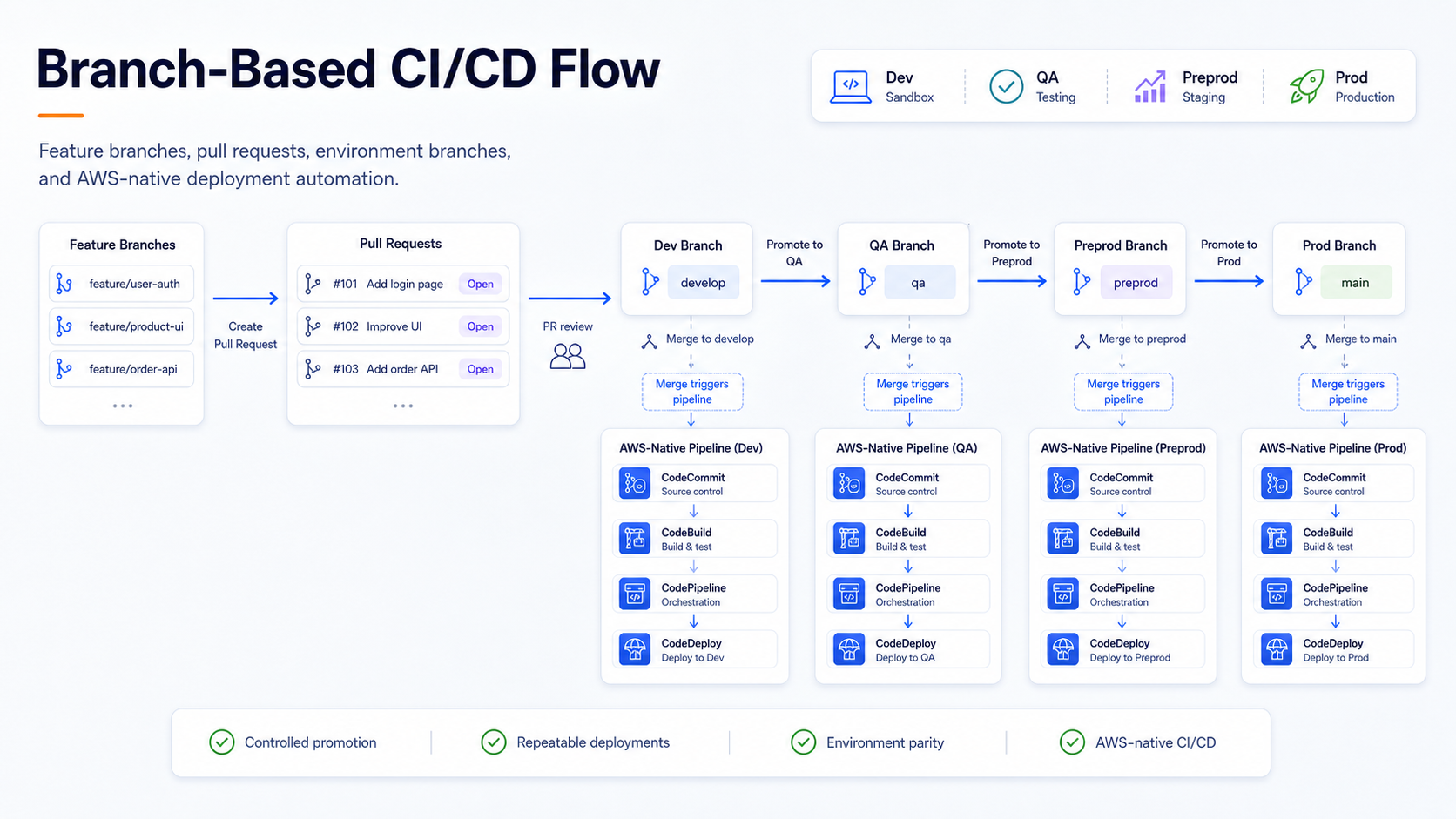
Branch-based CI/CD flow using AWS Code services, with separate deployment pipelines per environment.
Branch-based environment strategy
The environments were managed through separate branches:
devqapreprodprod
Each branch represented an environment and had its own infrastructure, deployment configuration, and RDS PostgreSQL database instance.
Changes were promoted by moving code from one branch to the next. For
example, changes could move from dev to qa,
then to preprod, and finally to prod.
For changes within the same environment, developers worked from short-lived sub-branches and opened pull requests into the target environment branch. Once the PR was reviewed and merged, the commit on that environment branch became the deployment trigger.
The flow looked like this:
- A developer created a short-lived branch from the target environment branch.
- The change was implemented and tested.
- A pull request was opened into the target environment branch.
- After review and merge, the environment pipeline was triggered.
- The corresponding infrastructure and application components were deployed.
This branch-per-environment model is not the only possible approach, and it may not be ideal for every organization. In this project, it fit the initial delivery model because each environment had a separate infrastructure stack, its own RDS PostgreSQL database instance, AWS-native pipelines, and a clear promotion process based on controlled branch merges.
Directory-based Lambda deployment
One of the most practical parts of the backend automation was the convention used for Lambda functions.
The repository included a predefined directory where Lambda function code was placed. When the backend pipeline ran, the automation scanned that directory, detected the Lambda functions, packaged them, and deployed them.
A simplified version of the repository convention looked like this:
backend/
  lambdas/
    create-quote/
      index.js
      package.json
    update-configuration/
      index.js
      package.json
    get-customer-options/
      index.js
      package.json
  scripts/
    deploy-lambdas.js
  infrastructure/
    template.yaml
This is not the real repository structure, but it illustrates the idea: each Lambda function lived in a predictable location, and the pipeline automation used that convention to package and deploy functions.
This created a simple workflow for adding new functions.
Once a new Lambda was implemented and tested, the developer placed the code in the expected directory structure and committed the change to the appropriate branch.
The pipeline then handled the rest.
In simplified terms:
- Create or update a Lambda function locally.
- Test it.
- Place it in the expected Lambda source directory.
- Commit and push the change.
- Let the pipeline detect, package, and deploy it.
This approach turned repository structure into part of the deployment contract.
A simplified version of the discovery logic could look like this:
const fs = require("fs");
const path = require("path");

const lambdasDir = path.join(__dirname, "../lambdas");

const functions = fs
  .readdirSync(lambdasDir, { withFileTypes: true })
  .filter((entry) => entry.isDirectory())
  .map((entry) => entry.name);

for (const functionName of functions) {
  console.log(`Packaging and deploying Lambda: ${functionName}`);

  // In the real pipeline, this step would package the function,
  // upload the artifact, and update the Lambda configuration/code.
}
A simplified AWS SDK deployment script for updating Lambda code looked like this:
import { LambdaClient, UpdateFunctionCodeCommand } from "@aws-sdk/client-lambda";
import { readFileSync } from "fs";

const lambda = new LambdaClient({ region: process.env.AWS_REGION });
const zipFile = readFileSync("./dist/lambda.zip");

await lambda.send(
  new UpdateFunctionCodeCommand({
    FunctionName: process.env.LAMBDA_FUNCTION_NAME,
    ZipFile: zipFile,
  })
);
And a simplified packaging step looked like this:
import AdmZip from "adm-zip";

const zip = new AdmZip();

zip.addLocalFile("./dist/lambda.js");
zip.addLocalFile("./dist/lambda.js.map");
zip.writeZip("./dist/lambda.zip");
The real implementation had to handle environment configuration, artifacts, IAM permissions, and deployment details, but the core idea was simple: discover functions from the repository layout, package them, and let the pipeline do the repetitive work.
It was not a fully generic platform, but it was simple, understandable, and effective for the team. The key was using conventions instead of requiring manual deployment steps for every new Lambda.
Why external tools were not introduced initially
A common question in this type of project is:
Why not use Terraform, Serverless Framework, GitHub Actions, GitLab CI, Jenkins, or Ansible?
The answer is context.
Those tools are valuable, and I have used several of them in other projects. Serverless Framework, in particular, can be useful for serverless backend deployment workflows. But the scope here was to create an initial AWS-native infrastructure and delivery model.
Introducing additional tools would have increased the number of moving parts:
- Another IaC or serverless deployment runtime.
- Another CI/CD system.
- Another credential model.
- Another integration layer.
- Another operational responsibility.
For the initial phase, the team needed a scalable and automated foundation that remained close to AWS.
So the architecture favored AWS-managed services:
- Amplify Hosting for frontend delivery.
- Lambda and API Gateway for backend execution and exposure.
- CloudFormation for infrastructure.
- AWS SDK for dynamic automation.
- AWS Code services for CI/CD.
This reduced external dependencies and kept the platform aligned with the serverless AWS direction of the project.
What worked well
Several decisions worked well in practice.
Using Amplify only where it added value
Amplify Hosting simplified delivery of the Next.js frontend without forcing the backend into Amplify-specific abstractions.
This was an important balance. The project benefited from Amplify’s hosting capabilities while keeping backend architecture independent.
Keeping authorization centralized
The Lambda Authorizer helped centralize API authorization logic. Backend Lambda functions could focus on business logic instead of repeatedly validating tokens.
Using AWS-native CI/CD
CodeCommit, CodeBuild, CodeDeploy, and CodePipeline provided an integrated delivery flow without introducing external CI/CD platforms.
This matched the project constraint and reduced integration overhead.
Using repository conventions
The directory-based Lambda deployment model made it easier to add backend functions without manually creating deployment steps each time.
This was a lightweight but effective form of internal platform convention.
Separating environments clearly
Using separate branches and infrastructure stacks for Dev, QA, Preprod, and Prod made the deployment model explicit.
Each environment had its own branch, pipeline, and infrastructure configuration.
Trade-offs and limitations
Every architecture has trade-offs.
This one was no exception.
Branch-per-environment can become difficult to manage
Managing environments through branches can work well in some contexts, but it also requires discipline. Teams need clear rules for promotion, pull requests, hotfixes, and branch synchronization.
In larger or more mature delivery models, other strategies may be preferable.
AWS-native does not always mean simpler
Using only AWS-native services reduces external dependencies, but it does not eliminate complexity.
IAM roles, service permissions, artifact management, pipeline configuration, environment separation, and deployment automation still require careful design.
CloudFormation sometimes needs help
CloudFormation is powerful, but it is not always the most flexible option for dynamic or convention-based deployment workflows.
Compared with tools such as Terraform, some infrastructure patterns and dynamic constructs may require additional scripting or SDK-based automation.
In this project, CloudFormation was complemented with AWS SDK where procedural logic was needed.
Amplify backend was not adopted
The project did not use the full Amplify backend model. That avoided coupling to Amplify-specific backend conventions, but it also meant that backend automation had to be designed separately.
This was a deliberate trade-off.
Lessons learned
The main lesson was that architecture is not only about choosing tools. It is about choosing the right level of abstraction for the project constraints.
In this case, AWS-native services provided a consistent foundation for frontend hosting, backend APIs, authentication, infrastructure automation, and CI/CD.
A few specific lessons stood out:
1. You can use Amplify without adopting the full Amplify ecosystem
Amplify Hosting can be valuable even when the backend is managed independently.
Adopting a service does not mean adopting every part of its ecosystem.
2. Full-stack convenience can introduce coupling
The newer Amplify backend model offered useful capabilities, including developer sandboxes. But adopting it would have required backend code and workflow changes.
For this project, that coupling was not the right trade-off.
3. Serverless still requires architecture
Lambda and API Gateway reduce server management, but they do not remove architecture decisions.
You still need to design API boundaries, authorization, deployment flows, environment separation, IAM permissions, and operational practices.
4. CI/CD is more than running a build
A working pipeline depends on source control, build scripts, artifact handling, deployment permissions, environment configuration, and rollback strategy.
The pipeline is part of the architecture.
5. Repository structure can become a deployment interface
The Lambda directory convention made the repository structure meaningful. Adding a function was not only a coding task. It followed a deployment contract understood by the automation.
6. AWS-native constraints can be useful
Constraints are not always negative. In this case, staying AWS-native helped reduce external dependencies and kept the initial platform focused.
7. Declarative IaC and SDK automation can work together
CloudFormation provided the infrastructure foundation, while AWS SDK helped implement dynamic deployment behavior that would have been harder to express only with static templates.
This was especially useful because CloudFormation was not as flexible as Terraform or other IaC tools for some patterns required by the project.
What I would improve in a next iteration
If I were evolving this architecture further, I would consider the following improvements:
- Add stronger automated tests for Lambda functions.
- Add dedicated tests for the Lambda Authorizer.
- Improve local developer workflows for backend testing.
- Add more explicit rollback procedures.
- Add security scanning to the pipeline.
- Add policy-as-code checks for infrastructure templates.
- Improve observability with structured logs, metrics, and alarms.
- Document the environment promotion process in more detail.
- Evaluate whether branch-per-environment should evolve into a different release strategy.
- Reassess whether Terraform, Serverless Framework, GitHub Actions, or another tool should be introduced as the platform matures.
The key point is that the initial design solved the first-stage requirements. Future iterations could introduce additional tools if the organization, team size, and operational needs justified them.
Final thoughts
This project was a good reminder that serverless architecture is not only about using Lambda.
The real engineering work is in connecting frontend hosting, backend APIs, authentication, database isolation, infrastructure automation, CI/CD, and environment management into a coherent delivery model.
In this case, Amplify Hosting was the right choice for Next.js frontend delivery because it simplified deployment and fit naturally into an AWS serverless architecture.
At the same time, the backend required more control. For that reason, it was implemented with API Gateway, Lambda, Lambda Authorizer, Auth0, CloudFormation, AWS SDK, and AWS Code services instead of adopting the full Amplify backend model.
The final architecture was not about using the most popular DevOps tools. It was about building the right initial foundation for the project constraints.
That foundation was AWS-native, serverless, automated, and designed to scale from the beginning.
About the author
Written by Daniel Buaon, Senior Cloud & AI
Infrastructure Engineer.
I write about Linux, AWS, DevOps, infrastructure automation, and
real-world troubleshooting.