
Fixing a WordPress wp-admin Redirect Loop Behind Docker and Nginx
May 2, 2026
When chmod 777 “Fixes” the Problem: AI, Linux Permissions, and the Human Troubleshooting Gap
May 2, 2026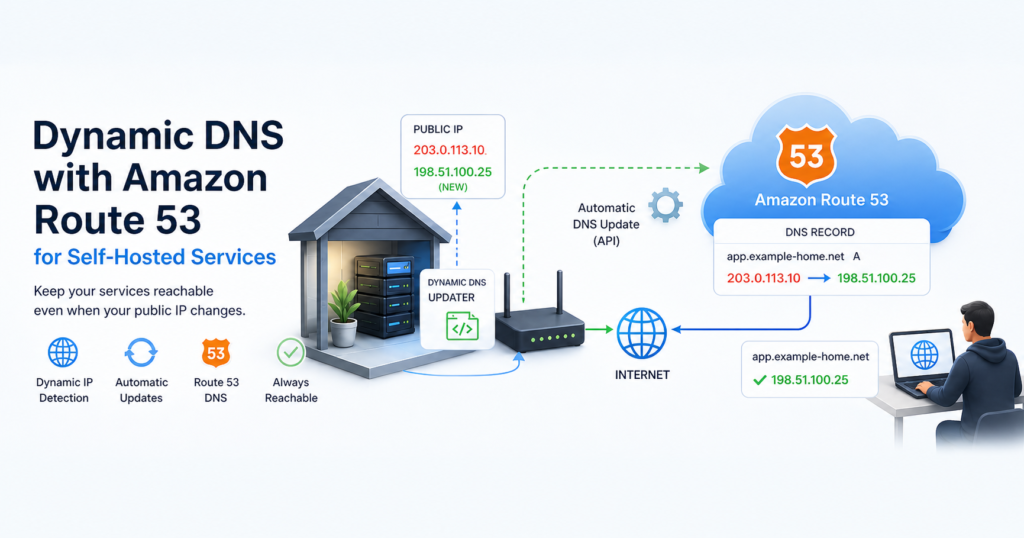
Dynamic DNS with Amazon Route 53 for Self-Hosted Services
By Daniel Buaon
Senior Cloud & AI Infrastructure Engineer
Self-hosting services from a home lab or small office environment can be very useful for learning, testing, and running personal projects.
However, there is one common issue: many residential or small business internet connections do not provide a static public IP address.
That means the public IP can change at any time.
If a domain in Amazon Route 53 points to the old IP address, the service becomes unreachable until the DNS record is updated.
This article shows a simple way to use Route 53 as a Dynamic DNS provider.
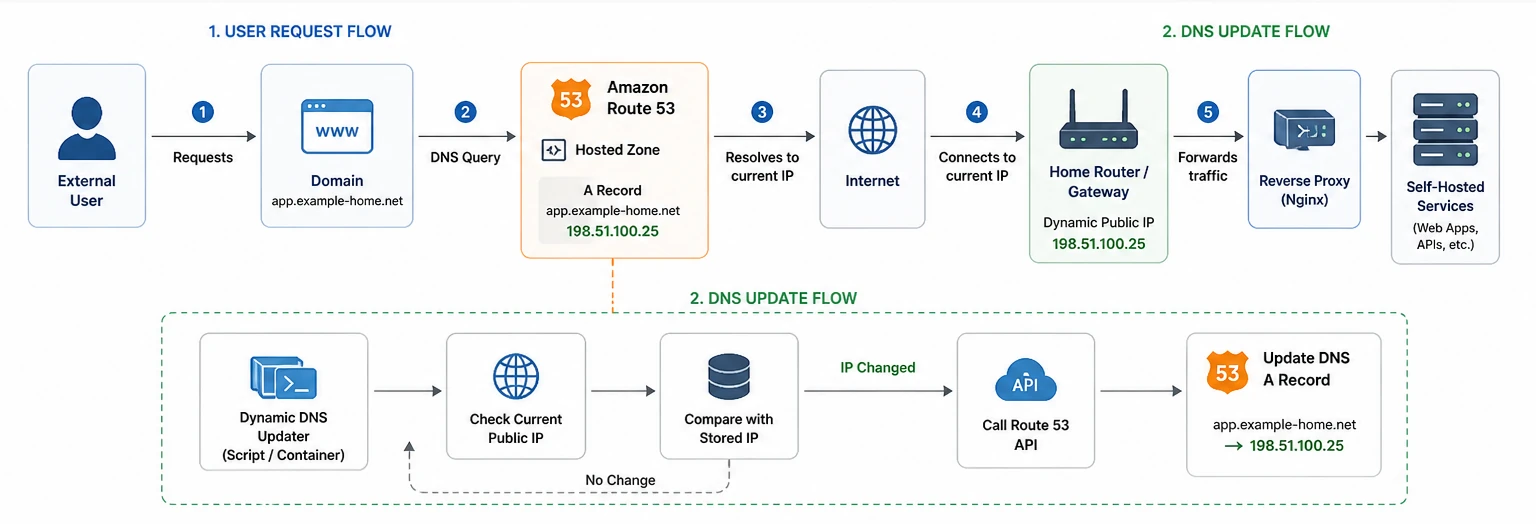
The Scenario
The environment was running several services behind a public IP address:
- WordPress sites running in Docker containers
- An Nginx container acting as reverse proxy and HTTPS endpoint
- Public DNS hosted in Amazon Route 53
- A public IP address assigned by the ISP
- Port forwarding from the router to the server
The simplified architecture looked like this:
Internet
  -> Route 53 DNS
  -> Dynamic public IP
  -> Router / port forwarding
  -> ESXi virtual machine
  -> Docker Nginx reverse proxy
  -> WordPress containers
The problem was simple: the public IP address could change.
When that happened, the Route 53 A records still pointed
to the previous IP.
The Goal
The goal was to automatically update Route 53 records when the public IP changed.
The process should:
- Detect the current public IP address
- Compare it with the IP configured in Route 53
- Update the DNS record only if the IP changed
- Run automatically from a Linux server
- Avoid manual changes in the AWS console
Checking the Current Public IP
The first step is to detect the current public IP address from the server.
A simple option is:
curl -s https://checkip.amazonaws.comExample output:
203.0.113.25This is the public IP seen from the internet.
Other alternatives include:
curl -s https://ifconfig.meor:
curl -s https://api.ipify.orgFor this setup, checkip.amazonaws.com was enough.
Listing Route 53 Hosted Zones
The hosted zones can be listed with:
aws route53 list-hosted-zones \
  --query "HostedZones[*].{Domain:Name,HostedZoneId:Id}" \
  --output table
Example output:
| Domain | HostedZoneId |
|---|---|
| example-services.net. | /hostedzone/Z111111111EXAMPLE1 |
| example-lab.com. | /hostedzone/Z222222222EXAMPLE2 |
For scripting, only the final part of the hosted zone ID is needed:
Z111111111EXAMPLE1
Z222222222EXAMPLE2
Listing A Records
To list the A records for a hosted zone:
aws route53 list-resource-record-sets \
  --hosted-zone-id Z222222222EXAMPLE2 \
  --query "ResourceRecordSets[?Type == 'A'].[Name,Type,TTL,ResourceRecords[*].Value]" \
  --output table
Example output:
| Name | Type | TTL | Value |
|---|---|---|---|
| example-lab.com. | A | 300 | 203.0.113.25 |
| www.example-lab.com. | A | 300 | 203.0.113.25 |
This confirmed that both the root domain and the www
record were pointing to the same public IP.
A Note About A Records and CNAMEs
There are two common ways to manage the root domain and
www.
Option 1: keep both as A records:
example-lab.com.      A    PUBLIC_IP
www.example-lab.com.  A    PUBLIC_IP
Option 2: keep only the root as an A record and use
CNAME for www:
example-lab.com.      A      PUBLIC_IP
www.example-lab.com.  CNAME  example-lab.com.
The second option is cleaner because only one A record
needs to be updated.
However, if the current setup already has multiple A
records, the script can update all of them.
Required IAM Permissions
The script needs permission to list and update Route 53 records.
A minimal IAM policy can look like this:
{
  "Version": "2012-10-17",
  "Statement": [
    {
      "Effect": "Allow",
      "Action": [
        "route53:ChangeResourceRecordSets",
        "route53:ListResourceRecordSets"
      ],
      "Resource": [
        "arn:aws:route53:::hostedzone/Z111111111EXAMPLE1",
        "arn:aws:route53:::hostedzone/Z222222222EXAMPLE2"
      ]
    },
    {
      "Effect": "Allow",
      "Action": [
        "route53:GetChange",
        "route53:ListHostedZones"
      ],
      "Resource": "*"
    }
  ]
}
The AWS credentials can be configured on the Linux server with:
aws configureRoute 53 is a global AWS service, but using us-east-1 as
the default region is fine for this type of script.
The Dynamic DNS Script
The following script updates all A records in the
selected hosted zones with the current public IP.
#!/usr/bin/env bash

set -euo pipefail

HOSTED_ZONES=(
  "Z222222222EXAMPLE2"  # example-lab.com
  "Z111111111EXAMPLE1" # example-services.net
)

TTL="300"

PUBLIC_IP=$(curl -s https://checkip.amazonaws.com | tr -d '\n')

if [[ -z "$PUBLIC_IP" ]]; then
  echo "$(date) - ERROR: Could not determine public IP"
  exit 1
fi

echo "$(date) - Current public IP: $PUBLIC_IP"

for HOSTED_ZONE_ID in "${HOSTED_ZONES[@]}"; do
  echo "$(date) - Processing hosted zone: $HOSTED_ZONE_ID"

  RECORDS=$(aws route53 list-resource-record-sets \
    --hosted-zone-id "$HOSTED_ZONE_ID" \
    --query "ResourceRecordSets[?Type == 'A'].Name" \
    --output text)

  if [[ -z "$RECORDS" ]]; then
    echo "$(date) - No A records found in $HOSTED_ZONE_ID"
    continue
  fi

  for RECORD_NAME in $RECORDS; do
    CURRENT_DNS_IP=$(aws route53 list-resource-record-sets \
      --hosted-zone-id "$HOSTED_ZONE_ID" \
      --query "ResourceRecordSets[?Name == '$RECORD_NAME' && Type == 'A'].ResourceRecords[0].Value" \
      --output text)

    if [[ "$CURRENT_DNS_IP" == "$PUBLIC_IP" ]]; then
      echo "$(date) - No change: $RECORD_NAME already points to $PUBLIC_IP"
      continue
    fi

    echo "$(date) - Updating $RECORD_NAME: $CURRENT_DNS_IP -> $PUBLIC_IP"

    CHANGE_BATCH=$(mktemp)

    cat > "$CHANGE_BATCH" <<JSON
{
  "Comment": "Dynamic DNS update",
  "Changes": [
    {
      "Action": "UPSERT",
      "ResourceRecordSet": {
        "Name": "$RECORD_NAME",
        "Type": "A",
        "TTL": $TTL,
        "ResourceRecords": [
          {
            "Value": "$PUBLIC_IP"
          }
        ]
      }
    }
  ]
}
JSON

    aws route53 change-resource-record-sets \
      --hosted-zone-id "$HOSTED_ZONE_ID" \
      --change-batch "file://$CHANGE_BATCH"

    rm -f "$CHANGE_BATCH"
  done
done

echo "$(date) - Finished"
Installing the Script
Save the script as:
sudo vi /usr/local/bin/update-route53-ddns.shMake it executable:
sudo chmod +x /usr/local/bin/update-route53-ddns.shRun it manually first:
/usr/local/bin/update-route53-ddns.shIf the current public IP already matches the DNS records, the script should report that no changes are needed.
Running It Automatically with Cron
To run the script every five minutes:
crontab -eAdd:
*/5 * * * * /usr/local/bin/update-route53-ddns.sh >> /var/log/route53-ddns.log 2>&1The logs can be checked with:
tail -f /var/log/route53-ddns.logImportant Considerations
This approach is simple and works well for personal labs and small self-hosted environments.
However, there are some important considerations.
First, the script updates all A records in the selected
hosted zones. That is convenient, but it can be dangerous if the zone
contains records that should not point to the home or lab public IP.
For production use, it may be better to define an explicit list of records to update.
Second, the TTL controls how quickly clients may pick up the new IP. A TTL of 300 seconds is usually acceptable. A lower TTL, such as 60 seconds, can make changes propagate faster, but it also increases DNS query frequency.
Third, this solution assumes that the public IP is reachable from the internet. If the ISP uses CGNAT, inbound access may not work even if DNS is correct.
Validation
After the script runs, the DNS records can be checked with:
dig +short example-lab.com
dig +short www.example-lab.com
The output should match the current public IP:
curl -s https://checkip.amazonaws.comYou can also verify through Route 53:
aws route53 list-resource-record-sets \
  --hosted-zone-id Z222222222EXAMPLE2 \
  --query "ResourceRecordSets[?Type == 'A'].[Name,ResourceRecords[*].Value]" \
  --output table
Lessons Learned
Route 53 can be used as a simple Dynamic DNS provider with only a small Bash script and the AWS CLI.
The key points are:
- Detect the current public IP from the server.
- Query the current DNS value from Route 53.
- Update only when the IP changes.
- Use IAM permissions scoped to the required hosted zones.
- Keep TTL values reasonably low.
- Be careful when updating all
Arecords in a zone. - Confirm that the ISP is not using CGNAT if inbound access is required.
Conclusion
Self-hosting behind a dynamic public IP does not require a third-party Dynamic DNS provider.
If the domain is already managed in Route 53, a small script can keep DNS records synchronized with the current public IP.
For personal labs, WordPress sites, testing environments, and small self-hosted services, this is a practical and transparent solution that keeps the domain reachable without manual DNS updates.
About the author
Written by Daniel Buaon, Senior Cloud & AI
Infrastructure Engineer.
I write about Linux, AWS, DevOps, infrastructure automation, and
real-world troubleshooting.